
I'm self-hosting some open LLM models on AWS Spot EC2 instances for personal use.
It wasn't my primary goal, but I'm happy enough with my setup to downgrade my Claude subscription from Max ($100/mo) to the Pro plan ($20/mo).
Here is what I learned along the way.
- What model do we need for software development?
- You don't need the most expensive GPU, but one with enough virtual memory
- Renting GPU under their market value: AWS Spot Instances
- From Claude Code to Hermes
- What about parallel work and sub-agents?
- What's next?
What model do we need for software development?
Take Llama 3.2 (3 billion parameters - 2 GB of memory), a Small Language Model (SLM) that runs on any device, laptop, even your smartphone.
ollama run llama3.2
pulling manifest
pulling dde5aa3fc5ff: 100% ▕███████████████████▏ 2.0 GB
verifying sha256 digest
writing manifest
success
>>> say hi
Hi!
This model is great to do basic tasks, offline, directly on the device like text summarization, rewriting, etc.
But to do software development, like you would do with Claude Code or Codex, you need specialized models that can think about complex tasks and work with a very large context, having hundreds of billions of parameters. Or so I thought.
Providers don't reveal the details of their models, but in 2024 it was estimated that Sonnet 3.5 had ~175 billion and GPT-4o had ~200 billion parameters. The latest models are estimated to have trillions.
I wanted to try some open models with the same order of magnitude of capacity as Sonnet, and there are some available on Ollama:
- ornith 1.5 model trained to "think" and self-improve (397b params / 242GB memory)
- qwen3-coder meant to produce code (30b params / 19GB memory)
I don't even have 300 GB on any of my disk, so I quickly chose the 10x-reduced version of ornith 1.5 to see how good it is (34b params / 23 GB of memory).
Do I even need a Large Language Model (LLM), or would some "medium" language models do the job for personal use? Some answers on this talk we had at the Tech F'Est 2026.
You don't need the most expensive GPU, but one with enough virtual memory
Ollama models work on a CPU as long as you have enough memory to fit the entire model. The generation speed depends on your computation power.
You can try to run ollama run qwen3-coder, if you have more than 20 GB of memory on your device it will work, but the generation speed will be very slow because of the number of parameters.
What you need is a GPU because they can do a lot more parallel computation. But not all GPUs are equal.
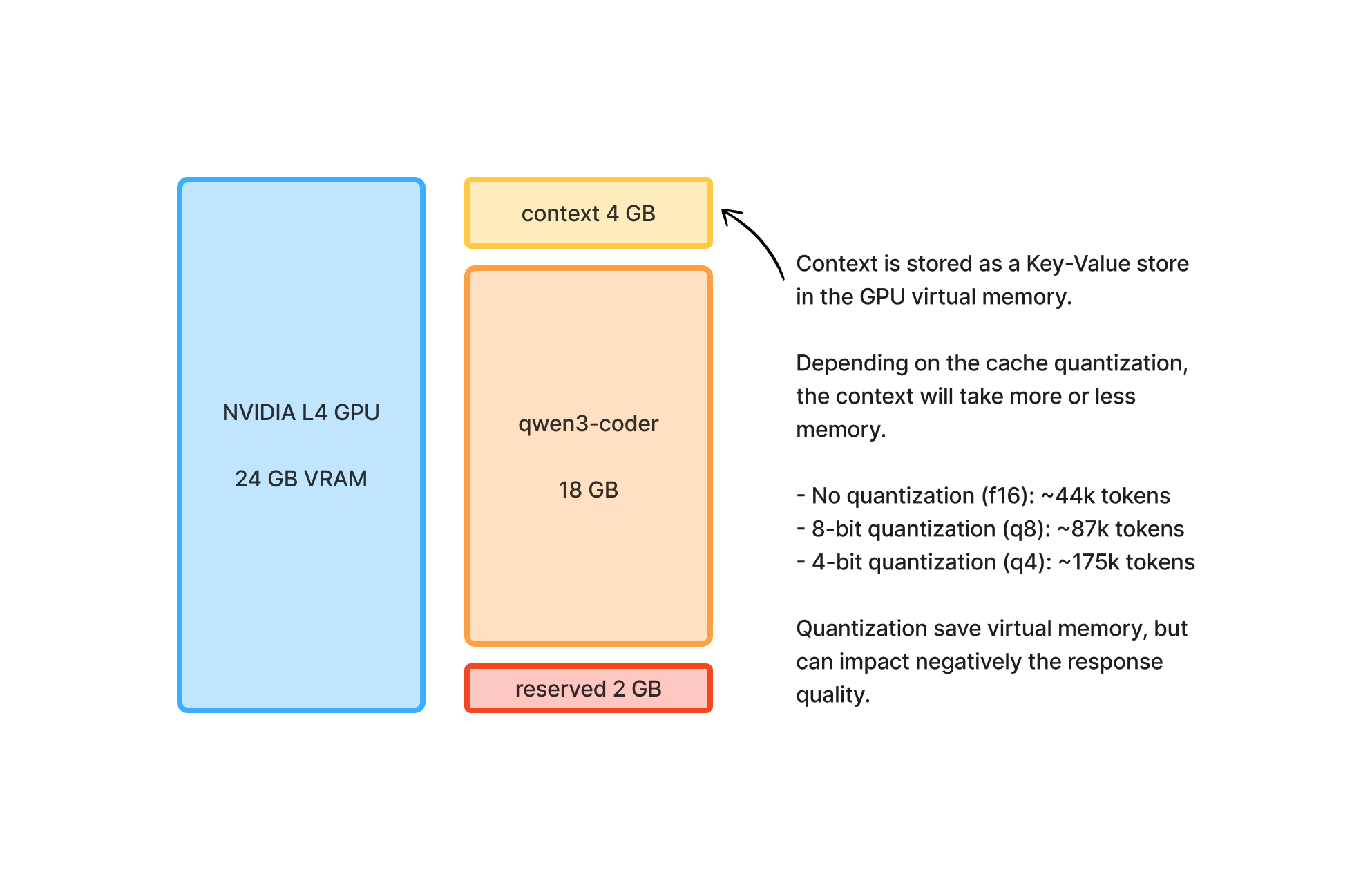
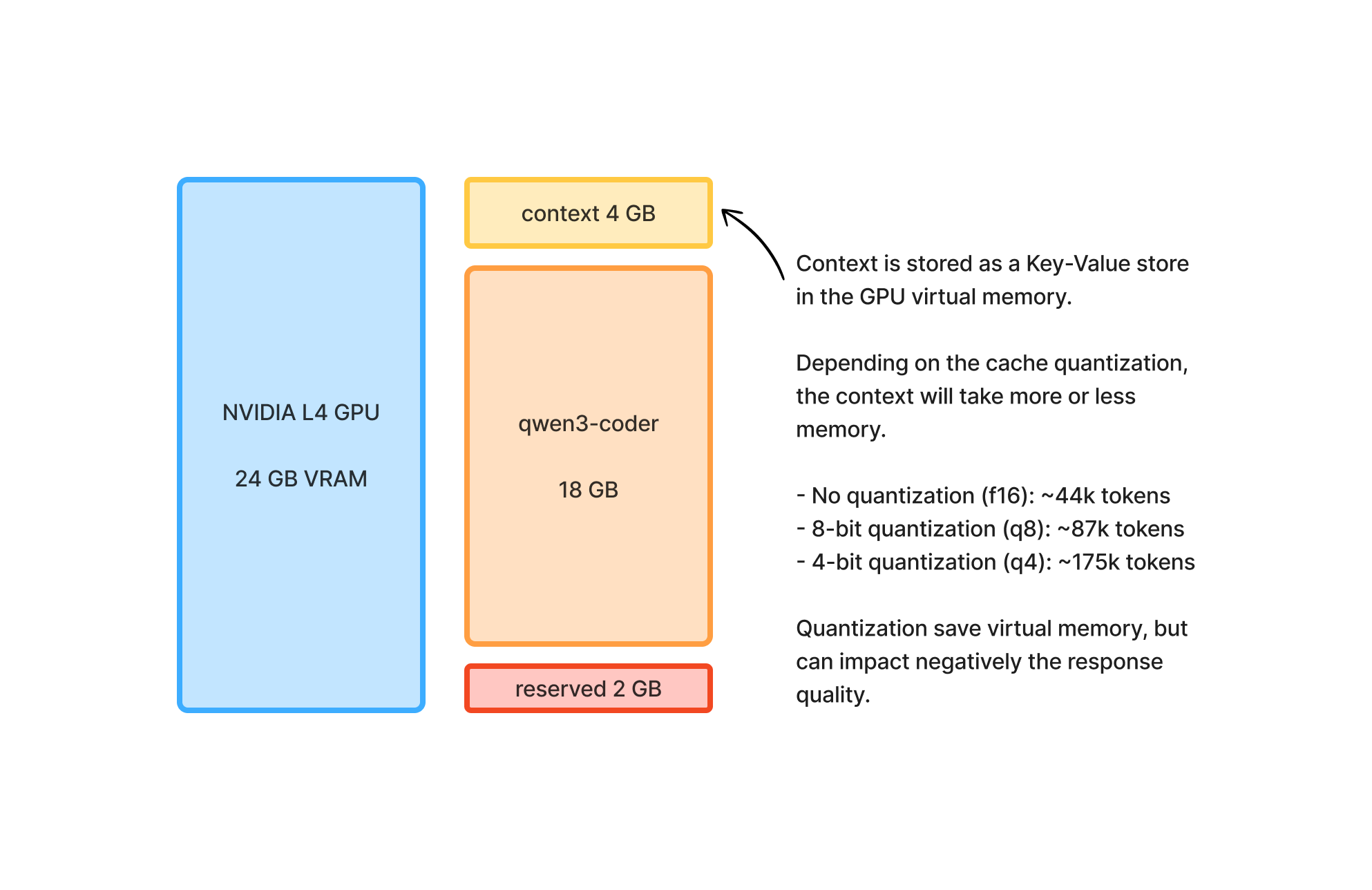
You need to have a GPU with enough virtual memory to fit the whole model in memory + the whole context size you want.
At home, I have an old gaming PC with a NVIDIA GeForce RTX 2060 card I bought in 2020. I tried it, but it only has 6 GB of virtual memory, which is not enough.
Ollama is smart enough to use the device memory as a failover when GPU VRAM is too small, but it means falling back on the CPU which defeats the purpose of using a GPU.
Apple Silicon devices have shared memory between CPU and GPU which is super helpful, because the GPU can read the device memory instead of its own VRAM.
Also, we could fit more context in the virtual memory with quantization but it may impact the model response quality.
Latest gaming GPUs can go up to 32 GB of VRAM, which is great to run those medium-sized models. But I don't want to buy one, which is only leaving me one solution.
Renting GPU under their market value: AWS Spot Instances
AWS has a range of GPU instances with different cards available.
They're also offering a reduced price for unused capacity on a service called AWS Spot Instances.
You choose the instance you want, they offer a reduced rate but the price is variable so you need to set a maximum price. When maximum price is reached, the instance is stopped, and you have to request a new one.
To enable EC2 Spot Instance, you first need to request a quota increase. It's usually approved in a few days max.
aws service-quotas request-service-quota-increase --service-code ec2 --quota-code L-3819A6DF --desired-value 32
The instances with a single GPU are ranging from $0.5/h to $10/h, depending on the availability.
I wrote a helper to spin up a spot instance, select the pricing, choose the Ollama models and spin it up: aws-llm-sandbox.
./up.sh
==> my public IP: xx.xx.xx.xx
==> security group sg-0d910bcfdb06e201e: 22 + 11434 open to xx.xx.xx.xx/32 only
==> no existing instance - launching a new one

Available GPUs (single-GPU instances). Pick by VRAM: the model + its KV cache must fit in it.
  1) 16 GB VRAM  NVIDIA T4                  2018 gen (g4dn). Cheapest; fits <=14B models at q4. Too small for 30B.
                   types: g4dn.xlarge, g4dn.2xlarge, g4dn.4xlarge, g4dn.8xlarge, g4dn.16xlarge
  2) 24 GB VRAM  NVIDIA A10G                2021 gen (g5). Same 24 GB tier as L4, ~same speed for Ollama; a second pool when g6 has no capacity.
                   types: g5.xlarge, g5.2xlarge, g5.4xlarge, g5.8xlarge, g5.16xlarge
  3) 24 GB VRAM  NVIDIA L4                  2023 gen (g6, gr6 = same GPU with 2x system RAM). 24 GB: one 30B model at q4 (~18 GB) + KV cache; only one big model resident at a time.
                   types: g6.xlarge, g6.2xlarge, g6.4xlarge, gr6.4xlarge, g6.8xlarge, gr6.8xlarge, g6.16xlarge
  4) 48 GB VRAM  NVIDIA L40S                2023 gen (g6e). 48 GB, ~2-3x L4 throughput: two 30B models resident, or 70B at q4, or 30B with a huge context.
                   types: g6e.xlarge, g6e.2xlarge, g6e.4xlarge, g6e.8xlarge, g6e.16xlarge
  5) 96 GB VRAM  NVIDIA RTX PRO Server 6000 2025 gen (g7e, Blackwell). 96 GB, often priced like the L40S: 70B at q8, 120B-class MoE at q4, or several 30B models resident.
                   types: g7e.2xlarge, g7e.4xlarge, g7e.8xlarge
GPU? [1-5] 4
==> fetching spot prices for: g6e.xlarge g6e.2xlarge g6e.4xlarge g6e.8xlarge g6e.16xlarge
==> fetching spot placement scores

     MARKET     TYPE           AZ                     $/h  SCORE  vCPU   RAM
   1) spot       g6e.4xlarge    eu-central-1b       0.5638  1      16     128 GB
   2) spot       g6e.4xlarge    eu-central-1a       1.0720  1      16     128 GB
   3) spot       g6e.2xlarge    eu-central-1b       1.1812  1      8      64 GB
   4) spot       g6e.xlarge     eu-central-1a       1.8827  3      4      32 GB
   5) spot       g6e.2xlarge    eu-central-1a       2.0247  1      8      64 GB
   6) spot       g6e.xlarge     eu-central-1c       2.0259  1      4      32 GB
   7) spot       g6e.4xlarge    eu-central-1c       2.2143  1      16     128 GB
   8) spot       g6e.xlarge     eu-central-1b       2.3270  1      4      32 GB
   9) on-demand  g6e.xlarge     any                 2.3270  -      4      32 GB
  10) spot       g6e.8xlarge    eu-central-1a       2.6137  1      32     256 GB
  11) spot       g6e.8xlarge    eu-central-1c       2.7531  1      32     256 GB
  12) spot       g6e.16xlarge   eu-central-1b       2.7611  1      64     512 GB
  13) spot       g6e.2xlarge    eu-central-1c       2.8035  1      8      64 GB
  14) on-demand  g6e.2xlarge    any                 2.8035  -      8      64 GB
  15) spot       g6e.16xlarge   eu-central-1a       2.9150  1      64     512 GB
  16) spot       g6e.16xlarge   eu-central-1c       3.2037  2      64     512 GB
  17) on-demand  g6e.4xlarge    any                 3.7565  -      16     128 GB
  18) spot       g6e.8xlarge    eu-central-1b       5.6625  1      32     256 GB
  19) on-demand  g6e.8xlarge    any                 5.6625  -      32     256 GB
  20) on-demand  g6e.16xlarge   any                 9.4745  -      64     512 GB

  SCORE: spot placement score 1-10 (10 = capacity very likely, 1 = unlikely).
  spot: market price, varies; AWS stops the instance if it rises above your cap. Needs the spot quota.
  on-demand: fixed price, never interrupted, no quota issue; AZ chosen by AWS where capacity exists.
Which one? [1-20]
I tested various instances, and there are family types (g5, g6, g6e) whose prices range from $0.5/h to $10/h, and I found my sweet spot with a g6.4xlarge instance to run my two models.
Cost Management = Just-in-time provisioning
A good way to save on the bill is to just stop the instance when you don't use it.
But when it's turned on, you have virtually no limit of tokens!
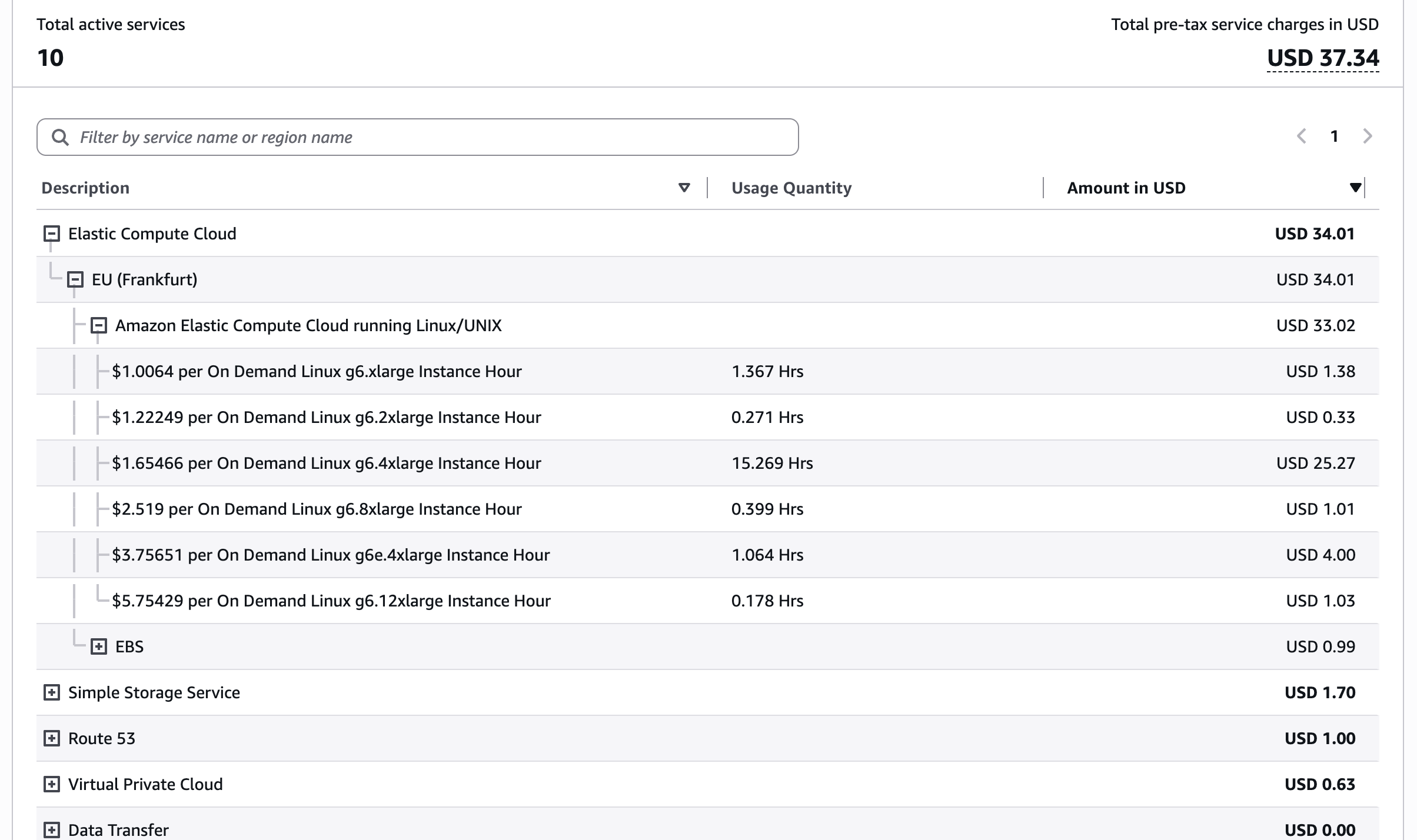
Here's my AWS bill from last month, and it was before I used Spot instances.
I'm still using Fable for most complex planning so I'm keeping Claude Pro for now. I tried all that to understand better and check if it was possible, but I'm saving a little bit of money, which is great. Obviously, it's not applicable in all situations.
But it's totally possible to orchestrate a fleet of low-cost GPU instances, with a routine that track the cheapest available spot instances on multiple regions for your own usage.
From Claude Code to Hermes
It is possible to run Ollama models with Claude Code. But I found it easier with Hermes.
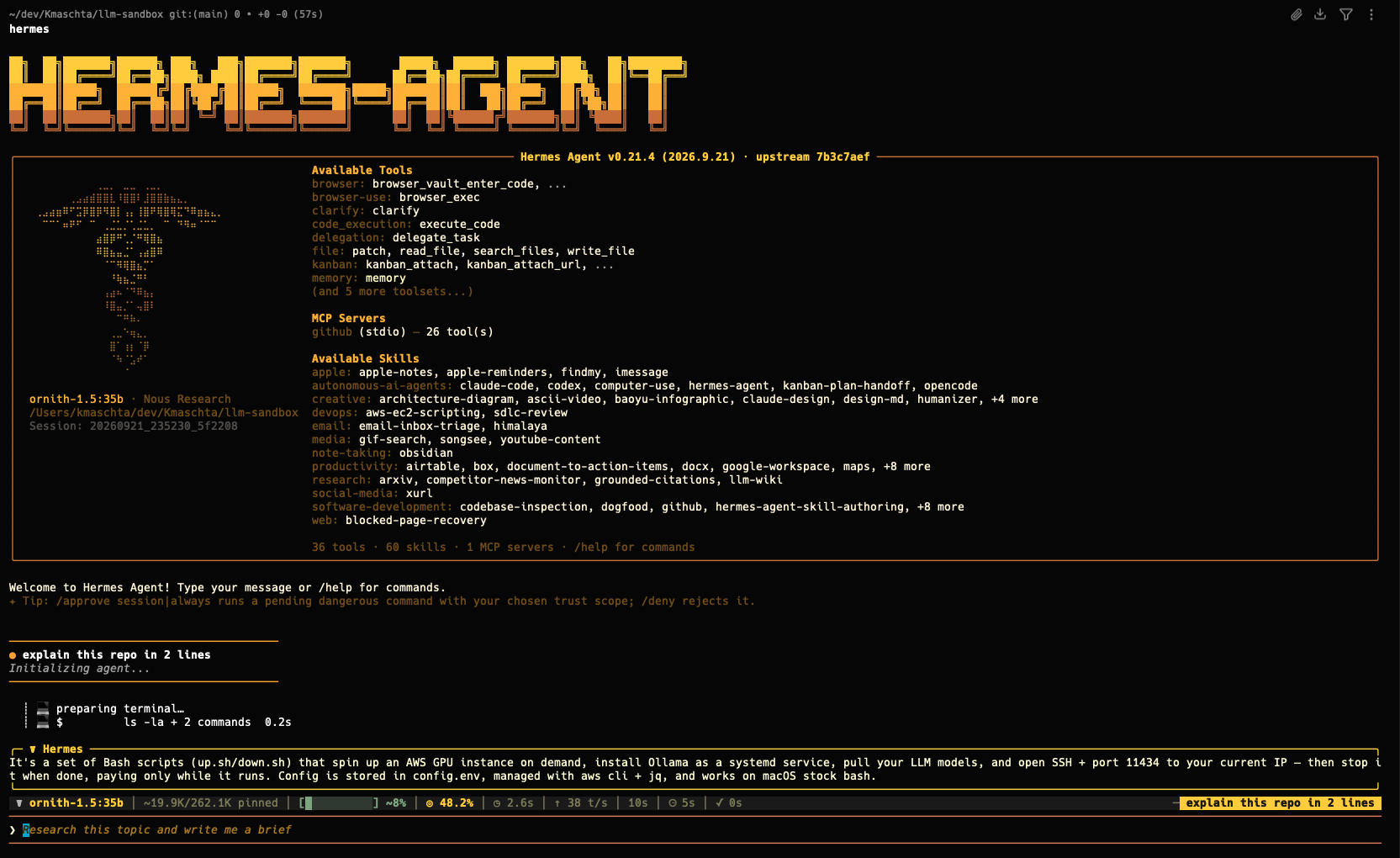
From Hermes, you can easily add your own custom models and switch provider and model in one command.
hermes model

  Current model:    ornith-1.5:35b
  Active provider:  llm-sandbox


Custom OpenAI-compatible endpoint configuration:

API base URL [e.g. https://api.example.com/v1]:
There are a lot of cool features with Hermes that can add up.
Like running multiple Profiles. One profile is a "Product Manager agent" running with ornith, a second is a "Coder agent" with qwen3, and a last "Architect" profile running Fable whose goal is to write the plan and test the feature in the end.
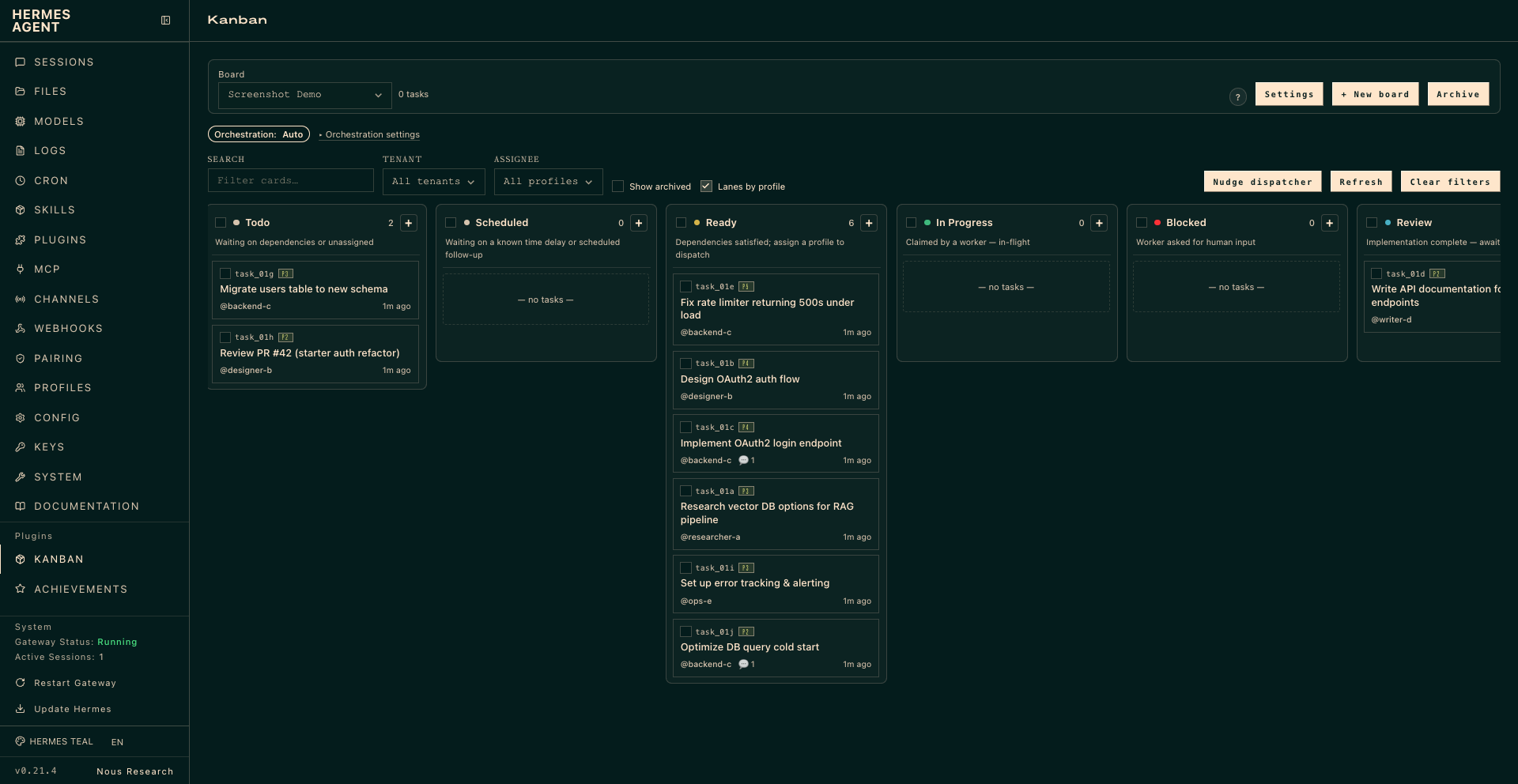
And you can then run a Kanban where the "Product agent" creates tickets, and some coder agents automatically pick up their tasks and implement them.
What about parallel work and sub-agents?
Ollama can totally handle concurrent requests, even with multiple models, if you have enough memory.
Here is an entire blog post describing how it works and how to configure it (fr).
I'm easily running 3 ornith agents in parallel on a g7e.4xlarge instance.
What's next?
Pretty much nothing, I'm happy with my setup for now and it allows me to test a LOT of models available on Ollama with different setups and automations.
I'm surprised how far I've got, I was expecting to hit a performance wall or spend way too much on GPU.
I didn't entirely get rid of the Claude models and their 1M context windows, but it was not the goal either.
By paying a Claude / Codex subscription we're not even paying for a fraction of the compute required, so it's still very cheap to keep your subscription.
For programmatic use, burst usage or a certain type of compliance need, though, you'll still find self-hosting useful. And just-in-time provisioning of GPU instances will probably come handy.
There are plenty of other things to play with, like an Ollama load balancer over multiple instances.
I'm curious how this could fit in some other contexts. Could a well-orchestrated fleet save the bill and footprint of a small/medium company?